UITableViewCell中:
        cell.detailTextLabel?.textColor = ColorConversationDetailText
        cell.detailTextLabel?.font = FontConversationDetailText
        cell.detailTextLabel?.textAlignment = NSTextAlignment.Left

cell.detailTextLabel?.text = "[张杰@我]工作完成的怎么样了"
已经可以实现这样的效果了:

想要实现这样的:

即:
UITableViewCell的detailText,部分是红色的,部分是灰色的
-》无法直接给,整个的detailTex去设置单一的颜色
自己先去试试:
看看直接加contentView看看是否可行
经过一番调整后,是可以通过contentView中显示的:
            let atMeStr:String = "[张杰@我]"
            let detailStr:String = "工作完成的怎么样了"
            cell.detailTextLabel?.text = atMeStr
            cell.detailTextLabel?.textColor = UIColor.redColor()

            let detailStrLabel:UILabel = UILabel(frame: CGRectMake(
                130,
                28,
                80,
                20))
            detailStrLabel.text = detailStr
            detailStrLabel.font = cell.detailTextLabel?.font
            detailStrLabel.textColor = UIColor.grayColor()
            //detailStrLabel.center.y = (cell.detailTextLabel?.center.y)!
            print("cell.detailTextLabel?.frame=\(cell.detailTextLabel?.frame)")
            cell.contentView.addSubview(detailStrLabel)
效果是:
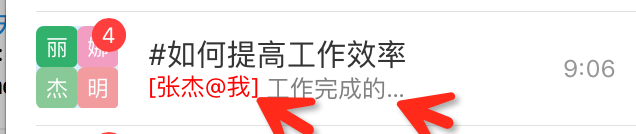
但是,还是希望:
精确的,智能的调整位置
-》就需要计算,atMe部分之后的y值,以及detailText的x值了
-》但是经过调试,发现此时的
cell.detailTextLabel?.frame=Optional((0.0, 0.0, 0.0, 0.0))
没发拿到真正的位置
-》另外,由于是:UIViewController
-》也没有:
override fun layoutSubviews
-》没法在layoutSubviews中去调节位置。
搜:
swift UITableViewCell detailtext frame
参考:
ios – How to change UITableView Cell text width in Swift – Stack Overflow
iphone – uitableviewcell textlabel too long and push detailtextlabel out of view – Stack Overflow
实在不行,再去继承UITableViewCell吧。。。
Swift-AutoLayout system UITableViewCell – CSDN博客
去看UITableViewDelegate,里面有个:
public protocol UITableViewDelegate : NSObjectProtocol, UIScrollViewDelegate {

    // Display customization

    @available(iOS 2.0, *)
    optional public func tableView(tableView: UITableView, willDisplayCell cell: UITableViewCell, forRowAtIndexPath indexPath: NSIndexPath)
    @available(iOS 6.0, *)
-》
UITableViewDelegate Protocol Reference
看到官网解释:
好像是在willDisplayCell之后,才设置对应的frame的
-》貌似在willDisplayCell时,frame还是空的0的值?
去试试:
如果不是,则可以设置detailText的值了
如果时0,则还是没办法设置正确的位置。
    func tableView(tableView: UITableView, willDisplayCell cell: UITableViewCell, forRowAtIndexPath indexPath: NSIndexPath){
        print("willDisplayCell indexPath = \(indexPath)")
        switch indexPath.row{
        case 4:
            print("cell.detailTextLabel?.frame=\(cell.detailTextLabel?.frame)")
            print("cell.detailTextLabel?.frame=\(cell.detailTextLabel?.frame)")
        default:
            break
        }

    }
输出log为:
willDisplayCell indexPath = <NSIndexPath: 0x7bec65a0> {length = 2, path = 0 – 4}
cell.detailTextLabel?.frame=Optional((71.0, 30.0, 56.0, 14.5))
cell.detailTextLabel?.frame=Optional((71.0, 30.0, 56.0, 14.5)) |
-》说明是:
willDisplayCell中,已经计算好了frame
-》此时就可以真正的计算和调整对应的位置了。
然后用代码:
            let atMeStr:String = "[张杰@我]"
            let atMeStrWidth:CGFloat = calcLabelTextSize(atMeStr, font: (cell.detailTextLabel?.font)!).width
            print("atMeStrWidth=\(atMeStrWidth)")
            let detailStr:String = "工作完成的怎么样了"
            let detailStrSize:CGSize = calcLabelTextSize(detailStr, font: (cell.detailTextLabel?.font)!)
            print("detailStrSize=\(detailStrSize)")

            cell.detailTextLabel?.text = atMeStr
            cell.detailTextLabel?.textColor = UIColor.redColor()

 //            print("cell.contentView.frame=\(cell.contentView.frame)")
//            print("cell.contentView.bounds=\(cell.contentView.bounds)")

            let detailStrLabel:UILabel = UILabel(frame: CGRectMake(
                atMeStrWidth,//61,//130,
                0,//28,
                detailStrSize.width,//80,
                detailStrSize.height))//20))
            detailStrLabel.text = detailStr
            detailStrLabel.font = cell.detailTextLabel?.font
            detailStrLabel.textColor = UIColor.grayColor()
            //detailStrLabel.center.y = (cell.detailTextLabel?.center.y)!
            print("cell.detailTextLabel?.frame=\(cell.detailTextLabel?.frame)")
            cell.detailTextLabel?.addSubview(detailStrLabel)
            //cell.contentView.addSubview(detailStrLabel)
即可实现对应的效果:
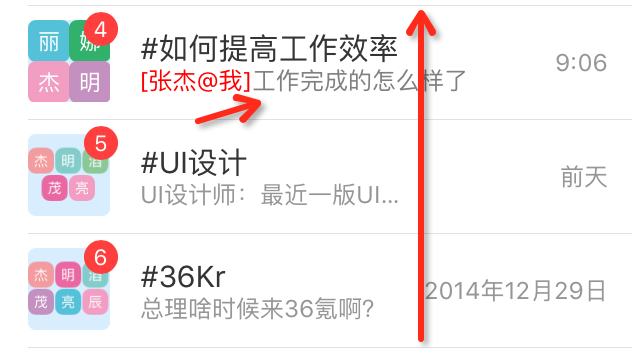
不过还有个小问题:
对于detailText的宽度,是不能超过accessory的最后发布日期的位置的,所以继续去优化。
[总结]
此处想要实现UITableViewCell的detailText中,额外添加一个Label的text使得颜色是不一样的红色,解决办法是:
可以直接把另外那个红色或灰色的UILabel,直接加入到已有的:
cell.detailTextLabel?.addSubview(detailStrLabel)
中即可。
当然,在此之前,需要去调节detailStrLabel的frame的位置
注意此frame的位置是相对于cell.detailTextLabel中的位置
【后记】
后来,了解了自动布局,以及如何继承,所以知道了:
其实可以去继承UITableViewCell,然后加上独立的label去控制,包括颜色,字体,就可以很简洁的方式去实现部分文字显示为红色了。