【背景】
折腾:
期间,需要去实现,动态创建多个TAB页面。
【折腾过程】
1.google搜:
android dynamic create tab
然后参考:
TabView (Part4) – Create dynamic content in tab at run time | Android Tech
看到其用到TabHost,所以去查查。
2.参考:
新浪微博布局学习——妙用TabHost – 农民伯伯 – 博客园
Android TabHost的使用 – hpoi的专栏 – 博客频道 – CSDN.NET
最全的Android的Tab与TabHost讲解 – Android实例教程 – Android开发论坛 – 安卓开发论坛 – Android开发 – 安卓论坛 – 移动互联网门户
但是是用xml去定义固定的tab的。不是我要的。
3.关于动态创建Tab的,找到:
[1/2] Android学习笔记之——TabHost动态增加与删除与更新 | K-Beta
示例代码是:
tabhost.addTab(tabhost.newTabSpec("tab" + j).setIndicator(mytabviewlist.get(j)) .setContent(Mytabfirst.this));//这里就是intent tabhost.setCurrentTab(j); 但是还是没太大帮助。
4.算了,去参考:
去试试TabHost。
结果:
tabHost = getTabHost();
中找不到getTabHost。
5.另外参考:
TabView (Part 1) – Simple tab control in Android | Android Tech
把概念解释的很清晰。去好好看看。
6.参考:
Android dynamic TAB Control « PocketMagic
去试试。
结果用代码:
    	// -- check screen orientation -- //
    	m_display = getWindowManager().getDefaultDisplay();
        m_nScreenW = m_display.getWidth();
        m_nScreenH = m_display.getHeight();
        // create interface
        View m_vForm;
        if (m_nScreenW <= m_nScreenH)
        	m_vForm = _createTABForm();		// portrait interface
        else
        	m_vForm = _createEmptyForm();	// landscape interface
     	// show the panel on the screen
     	setContentView(m_vForm);
	}

    /** Create the TAB interface */
    @SuppressWarnings("deprecation")
	private ViewGroup _createTABForm() {
        // construct the TAB Host
        TabHost tabHost = new TabHost(this);
        tabHost.setLayoutParams(
        		new LinearLayout.LayoutParams(
                        LayoutParams.FILL_PARENT, LayoutParams.FILL_PARENT));

        // the tabhost needs a tabwidget, that is a container for the visible tabs
        TabWidget tabWidget = new TabWidget(this);
        tabWidget.setId(android.R.id.tabs);
        tabHost.addView(tabWidget, new LinearLayout.LayoutParams(
                  LayoutParams.FILL_PARENT, LayoutParams.FILL_PARENT));

        // the tabhost needs a frame layout for the views associated with each visible tab
        FrameLayout frameLayout = new FrameLayout(this);
        frameLayout.setId(android.R.id.tabcontent);
        frameLayout.setPadding(0, 65, 0, 0);
        tabHost.addView(frameLayout, new LinearLayout.LayoutParams(
                  LayoutParams.WRAP_CONTENT, LayoutParams.WRAP_CONTENT));

        // setup must be called if you are not initialising the tabhost from XML
        tabHost.setup();

        // create the tabs
        TabSpec ts1 = tabHost.newTabSpec("TAB_TAG_1");
        ts1.setIndicator("TAB-1");
        ts1.setContent(new TabHost.TabContentFactory(){
             public View createTabContent(String tag)
             {
            	 // -- this tab contains multiple control grouped in a panel -- //
             		LinearLayout panel = new LinearLayout(MainActivity.this);
             		panel.setLayoutParams(new LayoutParams(LayoutParams.FILL_PARENT,
             				LayoutParams.WRAP_CONTENT));
             		panel.setOrientation(LinearLayout.VERTICAL);
             		// Userid : label and text field
             		TextView lblUserid = new TextView(MainActivity.this);
             		lblUserid.setText("The label above the EditText");
             		lblUserid.setTextSize(TypedValue.COMPLEX_UNIT_SP, 10f);
             		lblUserid.setLayoutParams(new LayoutParams(LayoutParams.FILL_PARENT, LayoutParams.WRAP_CONTENT));

             		EditText ttfUserid = new EditText(MainActivity.this);
             		ttfUserid.setLayoutParams(new LayoutParams(LayoutParams.FILL_PARENT, LayoutParams.WRAP_CONTENT));

             		// login button
             		final Button btnLogin = new Button(MainActivity.this);
             		btnLogin.setText("Login");
             		btnLogin.setLayoutParams(new LayoutParams(LayoutParams.FILL_PARENT, LayoutParams.WRAP_CONTENT));
             		btnLogin.setGravity(Gravity.CENTER);
             		btnLogin.setOnClickListener(new View.OnClickListener() {
             			public void onClick(View view) {
             				Log.d("pocketmagic.net", "_createForm click but");
             			}
             		});
             		// 	actually adding the views to the panel
             		// 	userid
             		panel.addView(lblUserid);
             		panel.addView(ttfUserid);
             		// 	loginbutton
             		panel.addView(btnLogin);

             		return panel;
             } //TAB 1 done
        });
        tabHost.addTab(ts1);
//
//        TabSpec ts2 = tabHost.newTabSpec("TAB_TAG_2");
//        ts2.setIndicator("TAB-2");
//        ts2.setContent(new TabHost.TabContentFactory(){
//             public View createTabContent(String tag)
//             {
//            	 // -- this tab contains a single control - the listview -- //
//                 ListView ls1 = new ListView(MainActivity.this);
//                 ArrayAdapter<String> adapter = new ArrayAdapter<String>(
//                		 MainActivity.this,
//                		 android.R.layout.simple_list_item_1,
//                		 new String[]{"item1","item2","item3","item4","item5","item6","item7"});
//                  ls1.setAdapter(adapter);
//                  ls1.setOnCreateContextMenuListener(MainActivity.this);
//                  return ls1;
//             }
//        });
//        tabHost.addTab(ts2);
//
//        TabSpec ts3 = tabHost.newTabSpec("TAB_TAG_3");
//        ts3.setIndicator(" ");
//        ts3.setContent(new TabHost.TabContentFactory(){
//             public View createTabContent(String tag)
//             {
//            	 // -- this tab contains a single control  - a textview -- //
//            	 TextView textAbout = new TextView(MainActivity.this);
//            	 textAbout.setText("About this sample\n\nThis is the Dynamic TAB control sample for Android.\n\n(C)2010 Radu Motisan\nradu.motisan@gmail.com\nwww.pocketmagic.net");
//            	 textAbout.setTextSize(TypedValue.COMPLEX_UNIT_SP, 12f);
//            	 textAbout.setLayoutParams(new LayoutParams(LayoutParams.FILL_PARENT, LayoutParams.WRAP_CONTENT));
//            	 return textAbout;
//             }
//        });
//        tabHost.addTab(ts3);
//        // -- set the image for tab3, can be used after tab has been created too -- //
//        ImageView iv = (ImageView)tabHost.getTabWidget().getChildAt(2).findViewById(android.R.id.icon);
//        if (iv != null) iv.setImageDrawable(getResources().getDrawable(R.drawable.icon));

    	return tabHost;
 	}

    /** Create the empty interface for landscape*/
    private View _createEmptyForm() {
    	TextView text = new TextView(this);
    	text.setText("The interface is only available in PORTRAIT mode! Do the switch :-)");
    	text.setTextSize(TypedValue.COMPLEX_UNIT_SP, 18f);
    	text.setLayoutParams(new LayoutParams(LayoutParams.FILL_PARENT, LayoutParams.WRAP_CONTENT));
    	return text;
    }
却挂掉了。
7.
这里:
解释了静态的TAB和动态的TAB的逻辑:
tab组件是:TabWidget
(1)静态使用tab:
用xml定义好对应的布局
创建一个TabHost.TabSpec
然后再调用setContent()
示例代码:
TabHost.TabSpec spec=tabs.newTabSpec(“buttontab”);

spec.setContent(R.id.buttontab);
spec.setIndicator(“Button”);
tabs.addTab(spec);
(2)动态使用tab:
和静态的很类似:
唯一不同的只是
setContent()
时传入的是的TabHost.TabContentFactory实例
提供一个对应的createTabContent()的callback,返回view即可。
8.官网:
没有解释清楚,如何去动态的添加tab。
9.再去看:
TabWidget | Android Developers
还是没思路。
10.最后还是参考:
TabView (Part 1) – Simple tab control in Android | Android Tech
而用如下代码:
import android.widget.TabHost;
import android.widget.TabHost.TabSpec;

public class MainActivity extends FragmentActivity {

	@Override
	protected void onCreate(Bundle savedInstanceState) {
		super.onCreate(savedInstanceState);
		setContentView(R.layout.activity_main);

	    TabHost tabHost=(TabHost)findViewById(R.id.tabHost);
	    tabHost.setup();

	    TabSpec spec1=tabHost.newTabSpec("Tab 1");
	    spec1.setContent(R.id.tab1);
	    spec1.setIndicator("Tab 1");

	    TabSpec spec2=tabHost.newTabSpec("Tab 2");
	    spec2.setIndicator("Tab 2");
	    spec2.setContent(R.id.tab2);

	    TabSpec spec3=tabHost.newTabSpec("Tab 3");
	    spec3.setIndicator("Tab 3");
	    spec3.setContent(R.id.tab3);

	    tabHost.addTab(spec1);
	    tabHost.addTab(spec2);
	    tabHost.addTab(spec3);
	}
对应xml是:
/res/layout/activity_main.xml
内容为:
<?xml version="1.0" encoding="utf-8"?>

<TabHost    android:layout_width="fill_parent"
            android:layout_height="fill_parent"
            android:id="@+id/tabHost"
            xmlns:android="http://schemas.android.com/apk/res/android">

    <TabWidget
        android:layout_width="fill_parent"
        android:layout_height="wrap_content"
        android:id="@android:id/tabs"/>

    <FrameLayout
        android:layout_width="fill_parent"
        android:layout_height="fill_parent"
        android:id="@android:id/tabcontent">

        <LinearLayout
            android:layout_width="fill_parent"
            android:layout_height="wrap_content"
            android:id="@+id/tab1"
            android:orientation="vertical"
            android:paddingTop="60px">

            <TextView
                android:layout_width="fill_parent"
                android:layout_height="100px"
                android:text="This is tab1"
                android:id="@+id/txt1"/>

        </LinearLayout>

        <LinearLayout
            android:layout_width="fill_parent"
            android:layout_height="fill_parent"
            android:id="@+id/tab2"
            android:orientation="vertical"
            android:paddingTop="60px">

            <TextView
                android:layout_width="fill_parent"
                android:layout_height="100px"
                android:text="This is tab 2"
                android:id="@+id/txt2"/>

        </LinearLayout>

        <LinearLayout
            android:layout_width="fill_parent"
            android:layout_height="fill_parent"
            android:id="@+id/tab3"
            android:orientation="vertical"
            android:paddingTop="60px">

        <TextView
            android:layout_width="fill_parent"
            android:layout_height="100px"
            android:text="This is tab 3"
            android:id="@+id/txt3"/>

        </LinearLayout>
    </FrameLayout>

</TabHost>
然后可以显示出对应的三个TAB了:
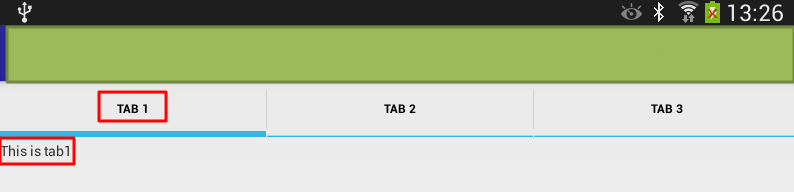
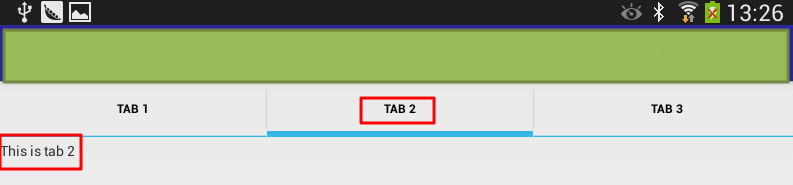
11.然后再继续参考教程:
TabView (Part4) – Create dynamic content in tab at run time | Android Tech
去改为动态添加tab:
	    TabHost tabHost=(TabHost)findViewById(R.id.tabHost);
	    tabHost.setup();

	    TabSpec spec1=tabHost.newTabSpec("Tab1");
	    spec1.setContent(new TabHost.TabContentFactory() {
	        public View createTabContent(String tag) {
	    	    TextView txtView = new TextView(MainActivity.this);
	    	    txtView.setText("Tab Text in createTabContent");
	            return txtView;
	        }
	    });
	    spec1.setIndicator("Tab Text for setIndicator");


	    TabSpec spec2=tabHost.newTabSpec("Tab2");
	    spec2.setIndicator("Tab Clock");
	    spec2.setContent(new TabHost.TabContentFactory() {
	        public View createTabContent(String tag) {
	            return(new AnalogClock(MainActivity.this));
	        }
	    });
	    spec2.setIndicator("Clock");

	    tabHost.addTab(spec1);
	    tabHost.addTab(spec2);
效果如下:
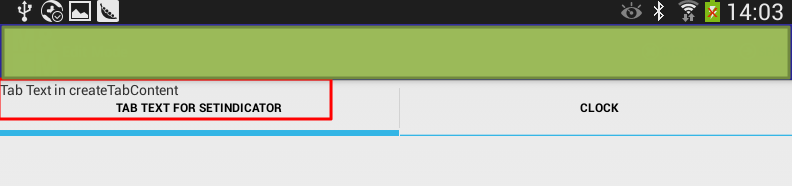
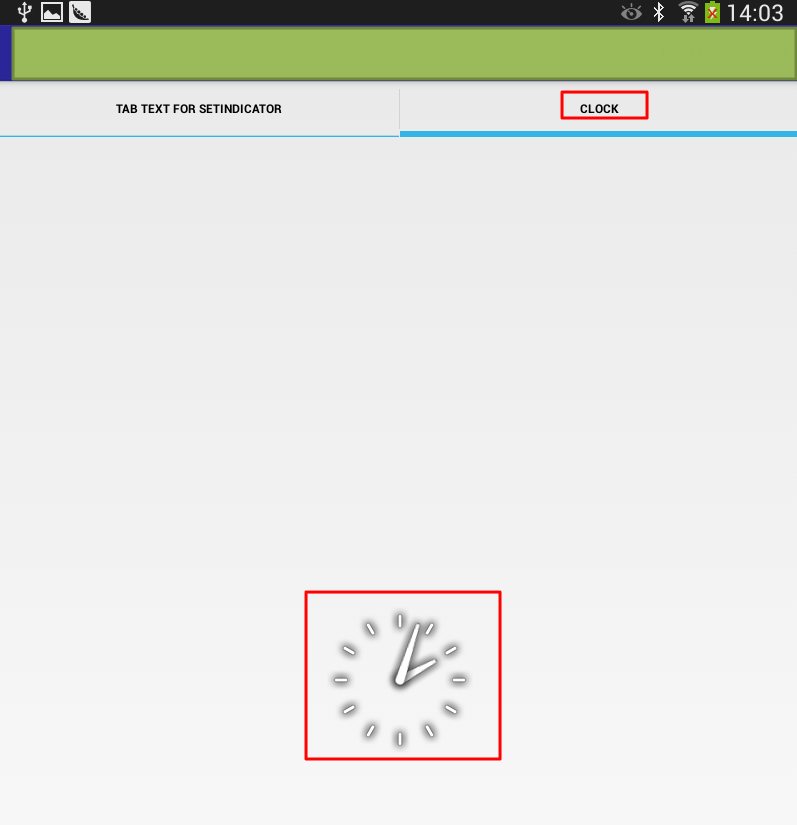
【总结】
此处,很明显是第一个tab添加后,text显示位置有误,但是暂时不去深究。
总之对于动态添加tab的功能,是实现了。
总结如下:
去
/res/layout/activity_main.xml
建立对应的布局配置:
<?xml version="1.0" encoding="utf-8"?>

<TabHost    android:layout_width="fill_parent"
            android:layout_height="fill_parent"
            android:id="@+id/tabHost"
            xmlns:android="http://schemas.android.com/apk/res/android">

    <TabWidget
        android:layout_width="fill_parent"
        android:layout_height="wrap_content"
        android:id="@android:id/tabs"/>

    <FrameLayout
        android:layout_width="fill_parent"
        android:layout_height="fill_parent"
        android:id="@android:id/tabcontent">

    </FrameLayout>

</TabHost>
然后去代码中,动态添加tab:
import android.view.Menu;
import android.view.View;

import android.widget.AnalogClock;

import android.widget.TabHost;
import android.widget.TabHost.TabSpec;
import android.widget.TextView;


public class MainActivity extends FragmentActivity {

	@Override
	protected void onCreate(Bundle savedInstanceState) {
		super.onCreate(savedInstanceState);
		setContentView(R.layout.activity_main);

	    TabHost tabHost=(TabHost)findViewById(R.id.tabHost);
	    tabHost.setup();

	    TabSpec spec1=tabHost.newTabSpec("Tab1");
	    spec1.setContent(new TabHost.TabContentFactory() {
	        public View createTabContent(String tag) {
	    	    TextView txtView = new TextView(MainActivity.this);
	    	    txtView.setText("Tab Text in createTabContent");
	            return txtView;
	        }
	    });
	    spec1.setIndicator("Tab Text for setIndicator");


	    TabSpec spec2=tabHost.newTabSpec("Tab2");
	    spec2.setIndicator("Tab Clock");
	    spec2.setContent(new TabHost.TabContentFactory() {
	        public View createTabContent(String tag) {
	            return(new AnalogClock(MainActivity.this));
	        }
	    });
	    spec2.setIndicator("Clock");

	    tabHost.addTab(spec1);
	    tabHost.addTab(spec2);
	}
即可。
转载请注明:在路上 » 【已解决】Android中动态创建多个TAB页面