【问题】
折腾:
的过程中,参考别人的代码:
c# How to add a new row to datagridview programmatically
结果去试试DataGridView:
            dgvSearchResult.Rows.Add();
            dgvSearchResult.Columns[0].HeaderText = "Title";
            dgvSearchResult.Columns[1].HeaderText = "Seller Rating";

            dgvSearchResult.Rows.Insert(0, "one", "two", "three", "four");

            dgvSearchResult.Rows.Add("fi1ve", "si2x", "sev3en", "e4ight");
结果出错了:
An unhandled exception of type ‘System.InvalidOperationException’ occurred in System.Windows.Forms.dll Additional information: No row can be added to a DataGridView control that does not have columns. Columns must be added first. |
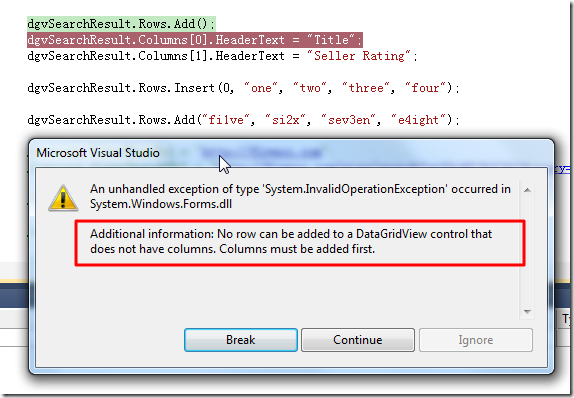
此处所遇到的问题是:
先是想要搞懂,对于刚创建了的DataGridView控件,需要哪些,初始化方面的动作,然后才能使用,才能添加数据的。
【解决过程】
1.后来参考:
才知道,原来DataGridView的数据来源有两种:
- 绑定DataSource
- 通过代码(手工)动态添加数据
2.后来,还是参考了微软的官网文档:
找到了有价值的解释说明:
DataGridView 控件提供用来显示数据的可自定义表。使用 DataGridView 类,可以通过使用 DefaultCellStyle、ColumnHeadersDefaultCellStyle、CellBorderStyle 和 GridColor 等属性对单元格、行、列和边框进行自定义。有关更多信息,请参见 Windows 窗体 DataGridView 控件中的基本格式设置和样式设置。
可以使用 DataGridView 控件来显示有基础数据源或没有基础数据源的数据。如果没有指定数据源,则可以创建包含数据的列和行,并使用 Rows 和 Columns 属性将它们直接添加到 DataGridView。还可以使用 Rows 集合访问 DataGridViewRow 对象和 DataGridViewRow.Cells 属性以直接读取或写入单元格值。Item 索引器还提供对单元格的直接访问。
除了手动填充控件之外,还可以设置 DataSource 和 DataMember 属性,以便将 DataGridView 绑定到数据源,并自动用数据填充该控件。有关更多信息,请参见在 Windows 窗体 DataGridView 控件中显示数据。
在处理大量数据时,可以将 VirtualMode 属性设置为 true,以便显示可用数据的子集。虚拟模式要求实现用来填充 DataGridView 控件的数据缓存。有关更多信息,请参见 Windows 窗体 DataGridView 控件中的数据显示模式。
和参考代码:
    private void SetupDataGridView()
    {
        this.Controls.Add(songsDataGridView);

        songsDataGridView.ColumnCount = 5;

        songsDataGridView.ColumnHeadersDefaultCellStyle.BackColor = Color.Navy;
        songsDataGridView.ColumnHeadersDefaultCellStyle.ForeColor = Color.White;
        songsDataGridView.ColumnHeadersDefaultCellStyle.Font =
            new Font(songsDataGridView.Font, FontStyle.Bold);

        songsDataGridView.Name = "songsDataGridView";
        songsDataGridView.Location = new Point(8, 8);
        songsDataGridView.Size = new Size(500, 250);
        songsDataGridView.AutoSizeRowsMode =
            DataGridViewAutoSizeRowsMode.DisplayedCellsExceptHeaders;
        songsDataGridView.ColumnHeadersBorderStyle =
            DataGridViewHeaderBorderStyle.Single;
        songsDataGridView.CellBorderStyle = DataGridViewCellBorderStyle.Single;
        songsDataGridView.GridColor = Color.Black;
        songsDataGridView.RowHeadersVisible = false;

        songsDataGridView.Columns[0].Name = "Release Date";
        songsDataGridView.Columns[1].Name = "Track";
        songsDataGridView.Columns[2].Name = "Title";
        songsDataGridView.Columns[3].Name = "Artist";
        songsDataGridView.Columns[4].Name = "Album";
        songsDataGridView.Columns[4].DefaultCellStyle.Font =
            new Font(songsDataGridView.DefaultCellStyle.Font, FontStyle.Italic);

        songsDataGridView.SelectionMode =
            DataGridViewSelectionMode.FullRowSelect;
        songsDataGridView.MultiSelect = false;
        songsDataGridView.Dock = DockStyle.Fill;

        songsDataGridView.CellFormatting += new
            DataGridViewCellFormattingEventHandler(
            songsDataGridView_CellFormatting);
    }
然后去试了试:
            dgvSearchResult.ColumnCount = 5;

            dgvSearchResult.Rows.Add();
            dgvSearchResult.Columns[0].HeaderText = "Title";
            dgvSearchResult.Columns[1].HeaderText = "Seller Rating";

            dgvSearchResult.Rows.Insert(0, "one", "two", "three", "four");

            dgvSearchResult.Rows.Add("fi1ve", "si2x", "sev3en", "e4ight");
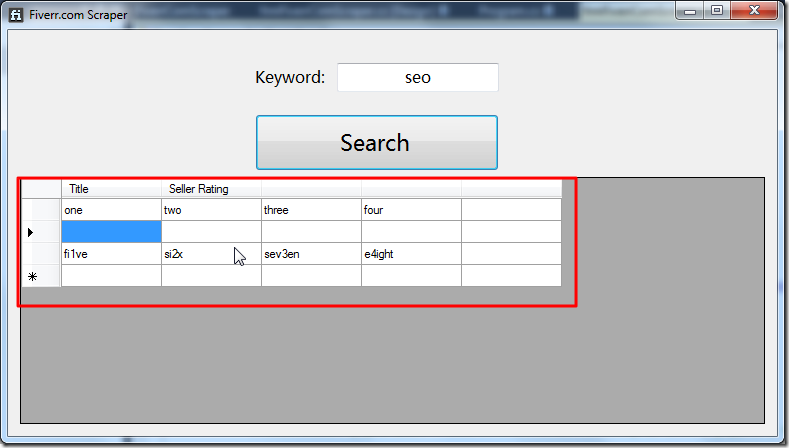
才可以正常执行数据添加的动作:
【总结】
发现了,网上的一堆资料,真的够烂,没几个能把问题说明白的。
真的只有官网,能把问题解释清楚,能够给出有效的参考代码的。
此处就是,对于没有绑定数据源的DataGridView,先要设置对应的列的数目,比如:
dgvSearchResult.ColumnCount = 5;
然后才能接着去,像很多人说的一样,用各种方式,添加对应的数据。
而如果没有初始化对应的列数,则会导致错误,后面的数据添加的代码,根本没法执行的。
而对于这样的事情,真的只有官网才能说明清楚,其他的人,都没说清楚。
转载请注明:在路上 » 【已解决】C#中的DataGridView控件使用出错:No row can be added to a DataGridView control that does not have columns