折腾:
【未解决】Python处理印象笔记中笔记的代码块发布到WordPress后丢失格式
期间,想办法找找,如何才能让:
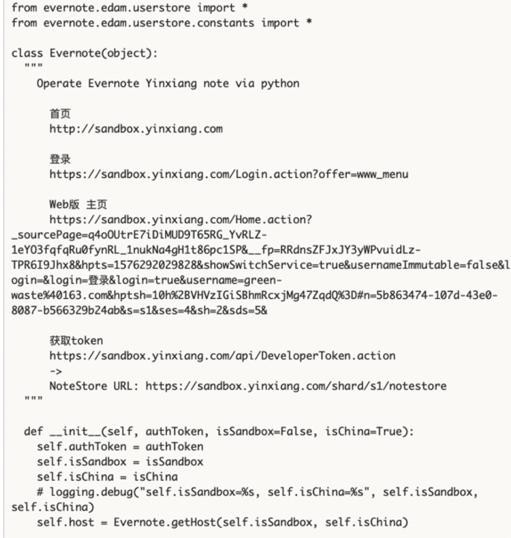
的原始的html:
        <div>class Evernote(object):</div>
        <div>  """</div>
        <div>    Operate Evernote Yinxiang note via python</div>
        <div>
            <div><br /></div>
        </div>
        <div>      首页</div>
        <div>      http://sandbox.yinxiang.com</div>
        <div>
            <div><br /></div>
的soup中,获取到内部的字符串值,且保留空格
此次去看看现有代码:
libs/crifan/utils.py
def getAllContents(curNode):
    """Get all contents of current and children nodes


    Args:
        curNode (soup node): current Beautifulsoup node
    Returns:
        str
    Raises:
    """
    # codeSnippetStr = curNode.prettify()
    # codeSnippetStr = curNode.string
    # codeSnippetStr = curNode.contents
    codeSnippetStr = ""
    stringList = []
    stringGenerator = curNode.stripped_strings
    # stringGenerator = curNode.strings
    for eachStr in stringGenerator:
        # logging.info("eachStr=%s", eachStr)
        stringList.append(eachStr)
    codeSnippetStr = "\n".join(stringList)
    logging.info("codeSnippetStr=%s", codeSnippetStr)
    return codeSnippetStr
很明显,是stripped_strings导致去掉了空格
那看看此处如何才能让
beautifulsoup get string with space
试试get_text()
感觉更像是:.strings
去试试
    if isStripped:
        stringGenerator = curNode.stripped_strings
    else:
        stringGenerator = curNode.strings
结果:
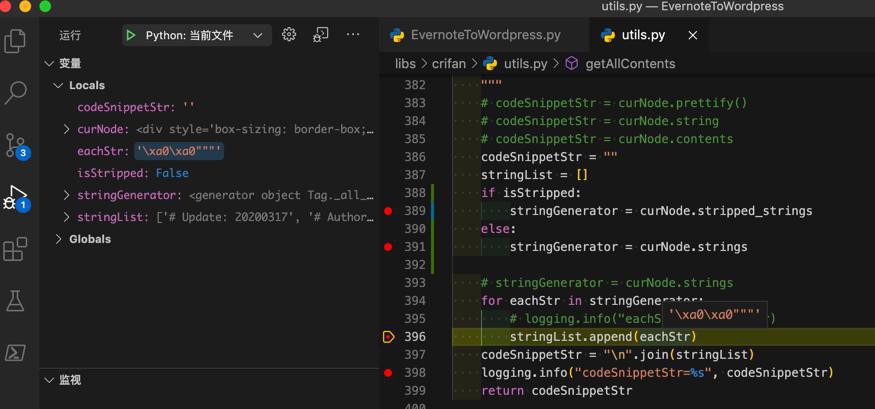
是可以保留空格的:
'\xa0\xa0"""'
说明是我们希望的。
【总结】
此处从:
stringGenerator = curNode.stripped_strings
改为:
stringGenerator = curNode.strings
即可保留html的节点中的空格,空行了。
相关函数完整代码:
def getAllContents(curNode, isStripped=False):
    """Get all contents of current and children nodes


    Args:
        curNode (soup node): current Beautifulsoup node
        isStripped (bool): return stripped string or not
    Returns:
        str
    Raises:
    """
    # codeSnippetStr = curNode.prettify()
    # codeSnippetStr = curNode.string
    # codeSnippetStr = curNode.contents
    codeSnippetStr = ""
    stringList = []
    if isStripped:
        stringGenerator = curNode.stripped_strings
    else:
        stringGenerator = curNode.strings


    # stringGenerator = curNode.strings
    for eachStr in stringGenerator:
        # logging.info("eachStr=%s", eachStr)
        logging.info("eachStr=%s", eachStr)
        stringList.append(eachStr)
    codeSnippetStr = "\n".join(stringList)
    logging.info("codeSnippetStr=%s", codeSnippetStr)
    return codeSnippetStr
供参考。